
Authors
Google and readers look for who wrote each article: their name, their role and their experience. The plugin publishes that in the structured data, from each author’s profile.
Each author’s profile
Section titled “Each author’s profile”In Users → Profile, the section Author information for search engines adds:
| Field | What to write |
|---|---|
| Job title | For example: Economy reporter. |
| Social networks and public profiles | One address per line: social networks, personal site, Muck Rack. Only what is written here is published. |
| Public contact | Optional. An email address or a link (contact form, Signal, SecureDrop) where readers and sources can reach the author. Better not the email they log in with. |
| Protect my identity | Profiles and contact are not published, and no Gravatar image is shown. For reporters who need to limit what is linked to their name. |
The biography is the usual WordPress Biographical Info field. The email of the account is never published.
The Authors screen
Section titled “The Authors screen”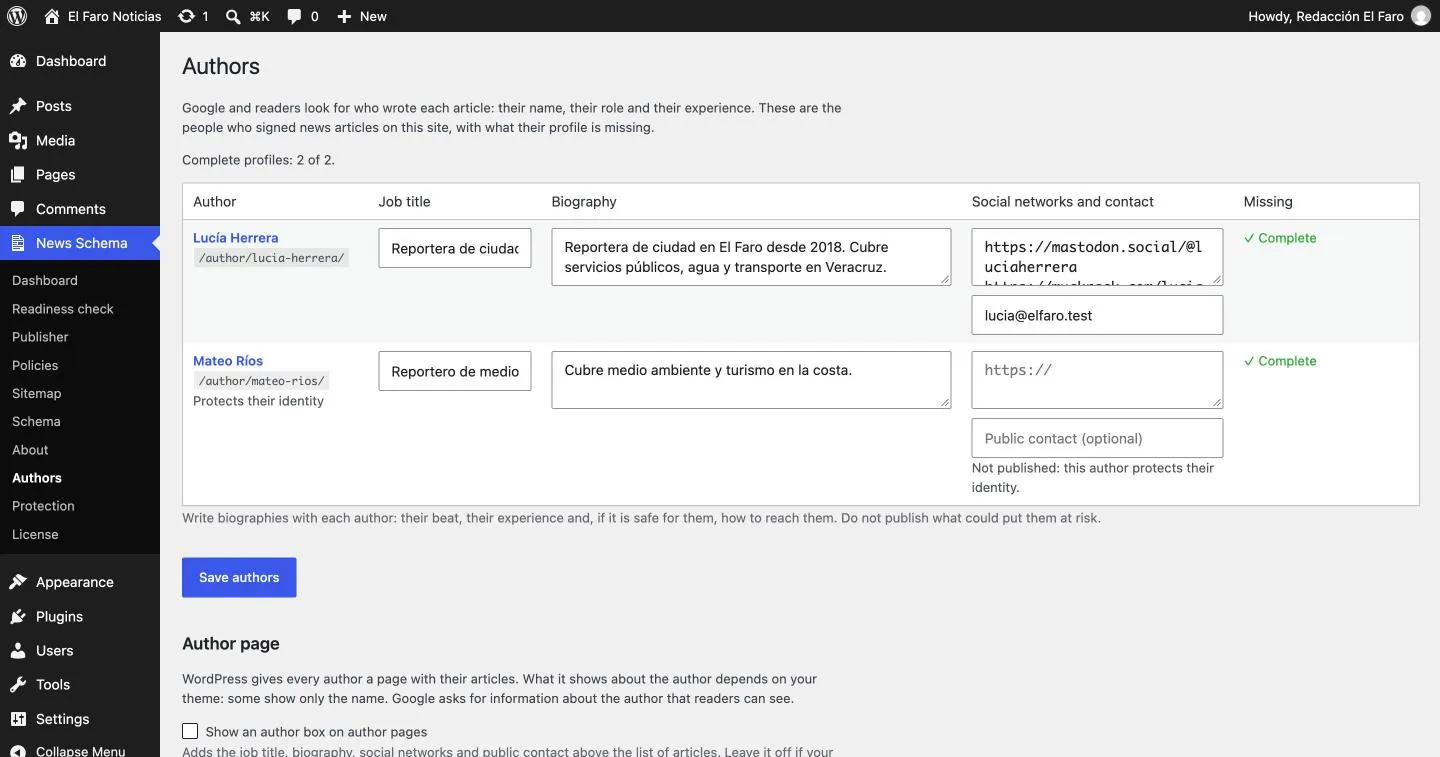
News Schema → Authors lists everyone who signed news articles, with what their profile is missing. You can complete job titles, biographies, networks and contacts for all of them at once and click Save authors.
Author addresses
Section titled “Author addresses”By default, the address of an author page is the login name (/author/ana/). That is half of what someone needs to guess their way into the site.
In Author addresses, the screen lists the authors whose address shows their login name. Write a new address for each and click Change these addresses.
The newsroom account
Section titled “The newsroom account”For articles without a byline, or by authors who prefer not to appear, use an account that signs as the newsroom. Its articles are attributed to the organization, not to a person.
- Click Create the newsroom account. Nobody can log in with it: it gets a random login name and password, and no email address.
- Or, if an existing account already signs with the name of your outlet, the screen offers Mark it as a newsroom account. You can also check This account signs as the newsroom, not as a person in its profile.
Choose this account as the author of the article in the editor. Explain when you do it in your Bylines and pseudonyms policy.
Author box
Section titled “Author box”WordPress gives every author a page with their articles. What it shows about the author depends on your theme. Google asks for information about the author that readers can see.
Turn on Show an author box on author pages to add the job title, biography, social networks and public contact above the list of articles. Leave it off if your theme already shows them: the readiness check tells you. Networks and contact are not shown for authors who protect their identity.